
티스토리 뷰
fieldset 태그를 이용하여 좀더 괜찮은 UI를 얻을 수 있다.
출처 : http://www.w3.org/TR/html4/interact/forms.html#idx-label-2
아래와 같은 정보를 입력|출력하는 화면이 있다고 하자. 어떻게 할 것인가?
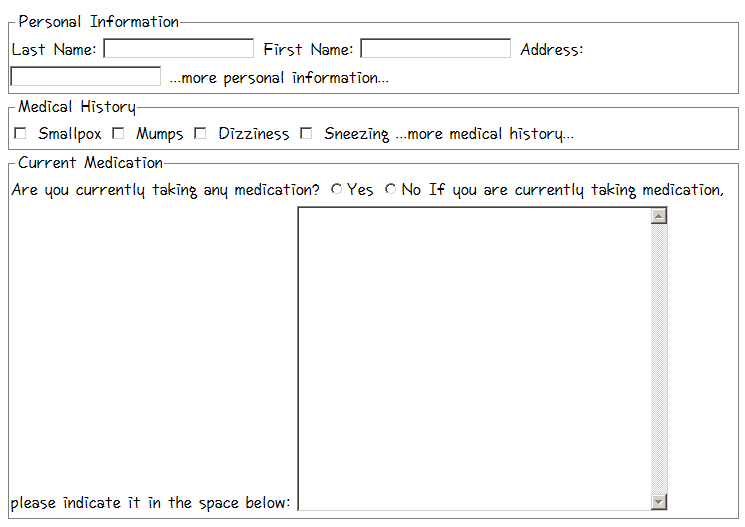
레이어가 생각나겠지만 레이어를 사용할 필요없다!!
아래 소스와 같이 <fieldset> 태그와 <legend> 태그만 있으면 멋진 UI가 나온다.
왜 이런것을 사용하지 않았을까?
copy & paste 의 부작용이 아닐까 싶다. -_-
문서를 찾아보지 않고 기존에 만들어져 있는것만 참고해서 만들려고 하다보니 <fieldset>, <legend> 태그가 있는지도 몰랐던 게 아닐까???
기존에 사용했던 것만 이용할 게 아니라 새로운 게 있는지 확인해 보자~~!!!
출처 : http://www.w3.org/TR/html4/interact/forms.html#idx-label-2
아래와 같은 정보를 입력|출력하는 화면이 있다고 하자. 어떻게 할 것인가?
레이어가 생각나겠지만 레이어를 사용할 필요없다!!
아래 소스와 같이 <fieldset> 태그와 <legend> 태그만 있으면 멋진 UI가 나온다.
<FORM action="..." method="post">
<P>
<FIELDSET>
<LEGEND>Personal Information</LEGEND>
Last Name: <INPUT name="personal_lastname" type="text" tabindex="1">
First Name: <INPUT name="personal_firstname" type="text" tabindex="2">
Address: <INPUT name="personal_address" type="text" tabindex="3">
...more personal information...
</FIELDSET>
<FIELDSET>
<LEGEND>Medical History</LEGEND>
<INPUT name="history_illness"
type="checkbox"
value="Smallpox" tabindex="20"> Smallpox
<INPUT name="history_illness"
type="checkbox"
value="Mumps" tabindex="21"> Mumps
<INPUT name="history_illness"
type="checkbox"
value="Dizziness" tabindex="22"> Dizziness
<INPUT name="history_illness"
type="checkbox"
value="Sneezing" tabindex="23"> Sneezing
...more medical history...
</FIELDSET>
<FIELDSET>
<LEGEND>Current Medication</LEGEND>
Are you currently taking any medication?
<INPUT name="medication_now"
type="radio"
value="Yes" tabindex="35">Yes
<INPUT name="medication_now"
type="radio"
value="No" tabindex="35">No
If you are currently taking medication, please indicate
it in the space below:
<TEXTAREA name="current_medication"
rows="20" cols="50"
tabindex="40">
</TEXTAREA>
</FIELDSET>
</FORM>
<P>
<FIELDSET>
<LEGEND>Personal Information</LEGEND>
Last Name: <INPUT name="personal_lastname" type="text" tabindex="1">
First Name: <INPUT name="personal_firstname" type="text" tabindex="2">
Address: <INPUT name="personal_address" type="text" tabindex="3">
...more personal information...
</FIELDSET>
<FIELDSET>
<LEGEND>Medical History</LEGEND>
<INPUT name="history_illness"
type="checkbox"
value="Smallpox" tabindex="20"> Smallpox
<INPUT name="history_illness"
type="checkbox"
value="Mumps" tabindex="21"> Mumps
<INPUT name="history_illness"
type="checkbox"
value="Dizziness" tabindex="22"> Dizziness
<INPUT name="history_illness"
type="checkbox"
value="Sneezing" tabindex="23"> Sneezing
...more medical history...
</FIELDSET>
<FIELDSET>
<LEGEND>Current Medication</LEGEND>
Are you currently taking any medication?
<INPUT name="medication_now"
type="radio"
value="Yes" tabindex="35">Yes
<INPUT name="medication_now"
type="radio"
value="No" tabindex="35">No
If you are currently taking medication, please indicate
it in the space below:
<TEXTAREA name="current_medication"
rows="20" cols="50"
tabindex="40">
</TEXTAREA>
</FIELDSET>
</FORM>
왜 이런것을 사용하지 않았을까?
copy & paste 의 부작용이 아닐까 싶다. -_-
문서를 찾아보지 않고 기존에 만들어져 있는것만 참고해서 만들려고 하다보니 <fieldset>, <legend> 태그가 있는지도 몰랐던 게 아닐까???
기존에 사용했던 것만 이용할 게 아니라 새로운 게 있는지 확인해 보자~~!!!
'Dev' 카테고리의 다른 글
| [펌]log4j 설정법 (4) | 2007.06.08 |
|---|---|
| ECLIPSE 및 WEBLOGIC-PLUGIN을 사용하여 WEBLOGIC SERVER 애플리케이션 디버깅 (0) | 2007.06.08 |
| Spring - Java/J2EE Application Framework (0) | 2007.03.27 |
| 태터 BBCode 플러그인 (0) | 2006.10.20 |
| subversion (0) | 2006.04.07 |
댓글
최근에 올라온 글
최근에 달린 댓글
- Total
- Today
- Yesterday
TAG
- 프로젝트
- 오라클
- Git
- 최대 메모리
- 액땜
- 무료 프로그램
- ubuntu
- 정부과천청사
- 안드로이드 앱
- 법무부
- 충동구매
- 파워콤해지
- 금연
- 헌혈
- oracle
- 출근
- Eclipse
- EditPlus
- GB-P100
- 낭패
- connect by
- iBATIS
- 김용
- 짜증
- 출근길
- 바이크
- 일하는 곳
- 윈도우
- VMware
- Java
| 일 | 월 | 화 | 수 | 목 | 금 | 토 |
|---|---|---|---|---|---|---|
| 1 | 2 | 3 | 4 | |||
| 5 | 6 | 7 | 8 | 9 | 10 | 11 |
| 12 | 13 | 14 | 15 | 16 | 17 | 18 |
| 19 | 20 | 21 | 22 | 23 | 24 | 25 |
| 26 | 27 | 28 | 29 | 30 | 31 |
글 보관함